Find Hidden Risks in Your Home

Search injury data by product category, build room-by-room safety checklists, and make informed decisions for your family — all backed by publicly available CPSC NEISS injury estimates.

SafeCheck Home provides educational safety information. It is not medical advice.

Search. Know. Decide.

Look up any product category — from cribs to power tools, high chairs to treadmills. See annual injury estimates, the most common injury types, affected body parts, and high-risk age groups. Every number comes from the CPSC NEISS database, the same data used by government researchers and safety engineers.
SafeCheck Home app showing a product category injury search
SafeCheck Home showing room-by-room safety checklists

Your Home, Room by Room

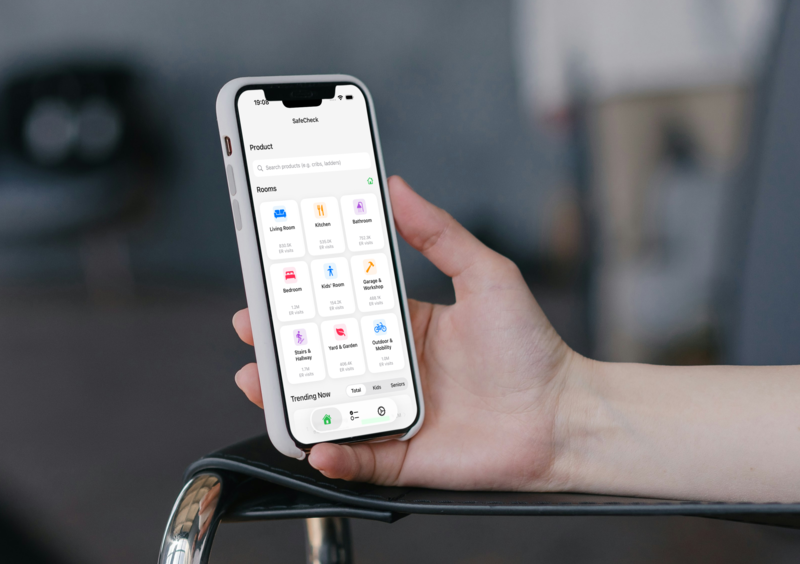
Create customized safety checklists for every room: nursery, kitchen, bathroom, garage. The app suggests risk areas based on real injury data for the products found in that space. Check off items as you childproof, and stay ahead of hazards as your family grows.

Built Around Who You Care For

Set the age of each family member and receive safety alerts matched to their stage of life — from nursery hazards for a toddler to fall risks for a grandparent. SafeCheck Home focuses its injury data and recommendations on children and older adults, the audiences this app is built for.

SafeCheck Home with age-tailored safety alerts for children and older adults
SafeCheck Home showing targeted safety tips and guidance

Not Just Numbers — Guidance

Detailed injury descriptions tell you what happened. SafeCheck Home goes further with targeted safety recommendations — what to check, what to fix, and what to watch for — so you know what to do next, not just what went wrong.

Real Reviews, Not Just Data

Alongside NEISS-based injury estimates, you can also read real comments from other families. Community notes are personal experiences, not official statistics — use them as context while you decide what to check next. The injury estimates still come from the CPSC NEISS system.

SafeCheck Home showing real user comments and community insights

Data You Can Trust

SafeCheck Home is powered by the CPSC National Electronic Injury Surveillance System (NEISS) — a federal database running since the 1970s. Unlike random tip lists, every injury statistic you see is drawn from a verifiable public CPSC NEISS source. We present the data clearly, with context about what the numbers mean and don't mean. Learn how NEISS works →

A hospital emergency department, the source of NEISS injury data

Frequently Asked Questions

What is SafeCheck Home?

SafeCheck Home is a consumer product safety app that helps families search injury statistics by product category, create room-by-room safety checklists, and receive age-tailored alerts. All data comes from the U.S. Consumer Product Safety Commission (CPSC) NEISS database.

What data does SafeCheck Home use?

SafeCheck Home uses publicly available data from the CPSC National Electronic Injury Surveillance System (NEISS), which has collected emergency room injury reports from a sample of U.S. hospitals since the 1970s. Data is statistically weighted to produce national estimates. The CPSC coding manual defines 1,000+ product categories and standard injury classifications.

Is the injury data reliable?

Yes. The data comes directly from the CPSC, a U.S. federal government agency. NEISS data is used by researchers, manufacturers, and public health officials to identify product-related hazards and inform safety standards. However, injury counts reflect reported ER visits and do not account for how many people use a given product (exposure rate). A product with many injuries may simply be more widely used.

What product categories can I search?

SafeCheck Home covers 1,000+ product categories from the CPSC coding manual, organized into 11 consumer-friendly groups: Nursery & Kids, Furniture & Home, Kitchen & Dining, Toys & Recreation, Tools & Hardware, Electronics, Sports & Exercise, Personal Care, Pet Supplies, Vehicles & Outdoor, and Home Improvement. From baby cribs to chainsaws, if it's in the NEISS database, you can look it up.

How does the safety checklist work?

You can create customized safety checklists for each room in your home — nursery, kitchen, bathroom, garage, and more. The app suggests risk areas based on injury data for the product categories typically found in that room. You can add your own items, check them off as you childproof, and revisit anytime as your household changes.

Is SafeCheck Home free?

SafeCheck Home is free to download and includes 30 free data queries. When that allotment is used up, a one-time $4.99 unlock (Unlimited SafeCheck Queries) continues unlimited querying — not a recurring subscription. Confirm the current IAP name and price on the App Store (verified desk 2026-11-05). Full detail: Free & Privacy FAQ.

Does the app collect personal data?

SafeCheck Home collects minimal data: safety checklist items you create, and anonymous usage statistics. We do not collect names, emails, locations, or device advertising identifiers. No data is sold or shared with third parties. See our Privacy Policy for full details.

How is SafeCheck Home different from other safety apps?

SafeCheck Home helps families explore public estimates powered by the official CPSC NEISS database — the same data used by government researchers and product safety engineers. Unlike recall-only apps, SafeCheck Home shows injury patterns across all products, not just recalled ones. See when injury patterns and recall lookup each help. And unlike random tip lists, every injury statistic is drawn from a verifiable public CPSC NEISS source. You can also read real community comments as supplementary context alongside the data. Learn more in our Free & Privacy FAQ.

Guides

What Is NEISS? Read CPSC injury numbers in plain English. Bathroom Safety for Seniors A fall-prevention checklist for older adults. Crib Safety Checklist Safer sleep for babies, step by step. High Chair Safety Safer mealtimes, from straps to placement. Changing Table Safety Never leave a baby unattended, even strapped. Play Yard Safety Bare sleep, only the manufacturer mattress. Window & Balcony Safety Screens aren’t barriers; use guards, stops, and netting. Infant Bath Safety Bathing aids aren’t safety devices; stay within arm’s reach. Childproofing Checklist Room-by-room childproofing for your home. Coffee Table Edge Safety Soften table edges and clear walking paths. Baby Gate Safety Hardware-mounted at the top and no climbing over. Home Safety Checklist for Older Adults Falls, fire, scalds, and everyday official hazards. Fall Prevention Checklist Reduce fall risks throughout the house. Stroller & Carrier Safety Safer outings with harness, brakes, and placement. Stairs & Floors Safety Walking-surface fall prevention for older adults. Free & Privacy FAQ Pricing, data collection, and who the app is for. Kids Bed & Bunk Safety Guardrails, rail fit, and safer toddler beds. Bedroom Fall Prevention Safer transfers and night paths for older adults. Furniture Tip-Over Prevention Anchor furniture and TVs, then soften table edges. Sofa & Couch Fall Prevention Never-alone habits and safer living-room play. Hard Floor Fall Prevention Clear paths, secure rugs, and safer play mats. Chair Fall Prevention No-climb habits and safer sit-to-stand support. Toilet Fall Prevention Grab bars, raised seats, and safer transfers. Footwear Fall Prevention Secure fit, heel support, and safer indoor shoes. Pet Supplies Fall Prevention Clear leashes, toys, and walkways for older adults. Backyard Trampoline Safety One jumper, full padding, and active supervision.

Protect Your Family

Free to download · 30 free queries · then one-time $4.99 for unlimited · no ads.