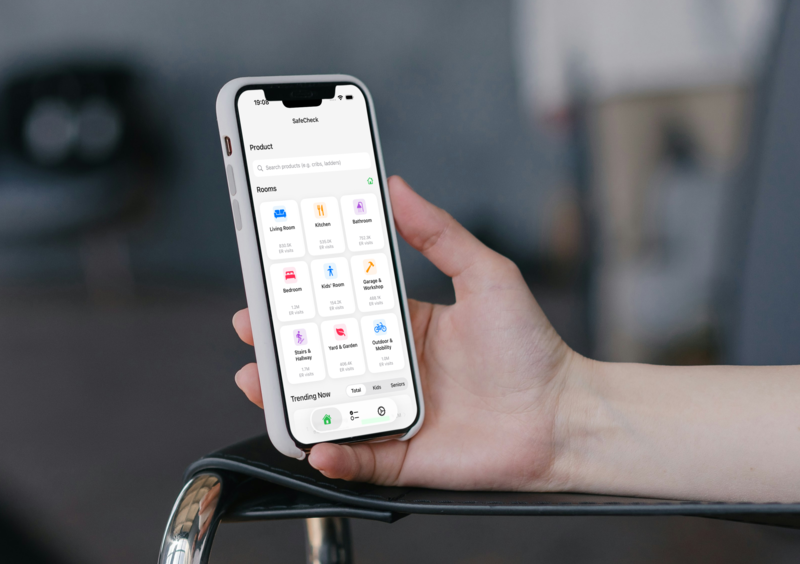
There is no single “best” home risk-assessment app because these tools do different jobs. Recall lookup asks whether a specific product or lot faces an official action. NEISS-based injury estimates show how often emergency departments treat injuries associated with product categories, helping you decide where to check first. Many households need both. This educational page compares jobs, not a ranked #1.
Disclosure
SafeCheck Home is ours and is included below as one tool class among several. Named third-party descriptions are based on public vendor or authority pages, last checked November 4, 2026.
Last updated & last checked: November 5, 2026
How we compare
This chooser compares tool classes by job fit, not a secret score or winner. We look for:
- Job: official recall answer, ongoing alerts, category stats, or room checks.
- Source and scope: official notices, public NEISS, hospital guidance, or vendor observations.
- Confirmation path: whether it points back to official sources.
- Age and room fit: childproofing, senior falls, or both.
- Limits: association is not causation; education does not replace care.
What Recall Tools Are For
A recall is a notice about a particular product, model, or lot and the action a manufacturer or agency is asking consumers to take. The useful detail is specific: the brand, model or identifying information, the hazard, the timeframe, and the remedy. That is why official recall search works best when you have an item in hand and can compare its identifying details to a notice.
For consumer products, two CPSC entry points are especially useful: SaferProducts.gov, where you can search reports about unsafe products, and CPSC Recalls, where CPSC recall and product-safety-warning listings are published. CPSC’s data hub also describes the mobile-only CPSC Recall App for searching product recalls.
Third-party recall-lookup tools can be helpful when they make official notices easier to search or alert you about products you own. But the key question is whether the tool points you back to the official notice, hazard, and remedy. For that reason, official CPSC sources are the best place to confirm what an alert means.
What Injury-Pattern Tools Are For
Injury-pattern tools look across product categories rather than at one SKU. They can help you see where emergency-department-treated injuries are commonly associated with broad groups of products, ages, diagnoses, or locations, then use that context to decide what to check first at home.
In the CPSC’s National Electronic Injury Surveillance System (NEISS), data comes from a probability sample of about 100 U.S. hospital emergency departments and is statistically weighted to produce national estimates. Those estimates describe injuries associated with consumer products — but not necessarily caused by them. Read the plain-English version in What Is NEISS?
Some websites specialize in browsing or scoring category-level NEISS statistics. SafeCheck Home uses the same public-data foundation differently: it emphasizes category injury views, room-by-room checklists, and age-tailored alerts for children and older adults. These jobs can complement each other; they do not have to compete.
Side-by-Side
Here is how the main kinds of tools fit together. No row is a substitute for all the others.
| Job | Typical data | Best when | Not a substitute for |
|---|---|---|---|
| Official recall search (+ CPSC Recall App if offered) | Specific product/lot notices, hazard, remedy | Item in hand; need official action status | Category injury prioritization |
| Recall-lookup apps (category) | Alerts/search over official notices | Ongoing alerts for owned products | NEISS prioritization; medical advice |
| NEISS Estimates Query Builder | Official custom national estimates | Research / power-user queries | Family room checklists |
| NEISS browse sites (category) | Category estimates; some also surface recalls/SaferProducts snapshots; relative scores | Exploring category patterns on the web | Live official recall confirmation; causation claims |
| Hospital-style child room checklists (historically Make Safe Happen) | Room-by-room child home checklists; reminders/progress; product links (per public pages) | Primary app stores unavailable as of Nov 2026; OK if already installed | Official recalls; NEISS Query Builder |
| Authority printable senior checklist (CDC STEADI Check for Safety) | Room-by-room fall-hazard checklist PDF | Caregivers wanting official printable senior checklist | Clinical care; product recall lookup |
| Camera childproofing scanners (class) | On-device visual hazard cues / local reports (per vendor marketing) | Quick visual room scan | Recalls; NEISS prioritization; medical advice |
| Room walkthrough / fix-planner apps (class only) | Guided notes, photo markers, fix lists (class) | Organizing household observations / fixes | Inspection certification; hazard auto-detect claims |
| Injury patterns + room checklists (SafeCheck Home) | NEISS category views; room checklists; age-tailored alerts for kids + seniors | Prioritizing home checks with quotable caveats | Official recall lookup for a specific product |
The common caveat: injury estimates describe products associated with emergency-department visits. They do not prove that a product caused those injuries.
A Simple Chooser
- Checking one product for a recall? Start with SaferProducts.gov or CPSC Recalls. A recall-lookup app can also help if it surfaces official notices.
- Prioritizing rooms or categories for kids or older adults? Injury patterns plus room checklists can help. That is the focus of SafeCheck Home.
- Need official custom estimates or research-style queries? Use the CPSC’s NEISS Query Builder.
- Want a hospital-style child room checklist? Primary app stores unavailable as of Nov 2026; OK if already installed. If not, use SafeCheck Home for kids-plus-seniors NEISS room prioritization, CDC STEADI for a printable senior checklist, and SaferProducts.gov or CPSC Recalls for a specific product.
In practice, you may use more than one. Different tools can be useful at different moments.
Best for…
These are job-fit notes, not rankings or a winner. Third-party facts come from the authority or vendor page named in Sources; all were last checked November 4, 2026.
Best when you need an official recall answer
Start with SaferProducts.gov or CPSC Recalls when you can match a brand, model, or item to official records. Per CPSC Data (November 3, 2026), the mobile-only CPSC Recall App complements web search. These authorities confirm what a third-party alert means.
Best when you want hospital-style child room checklists
Historically, Make Safe Happen offered Nationwide Children’s Hospital’s room-by-room child checklists, reminders, progress tracking, and product links. Primary app stores unavailable as of Nov 2026; OK if already installed. Otherwise, use SafeCheck Home for kids-plus-seniors NEISS room prioritization, CDC STEADI for a printable senior checklist, and SaferProducts.gov for a specific product. Such a checklist is not a NEISS browser or recall scanner.
Best when you want an official printable senior checklist
Use CDC STEADI’s Check for Safety PDF when a caregiver wants a printable older-adult fall-prevention baseline. It covers stairs, floors, kitchens, bedrooms, and bathrooms, including paths, rugs, lighting, grab bars, and non-slip surfaces. Pair it with clinical or occupational-therapy guidance as needed.
Best when exploring category stats on the web
PlainSafety is useful for browsing public CPSC datasets and relative category scores. Its methodology combines NEISS, SaferProducts.gov snapshots, and CPSC Recalls feeds, but it is independent and not CPSC-affiliated. Use it to explore patterns, not confirm live recalls or claim causation.
Best when prioritizing rooms for kids and seniors with NEISS context
SafeCheck Home, our product, uses NEISS-powered views across 1,000+ CPSC categories with room checklists and age-tailored alerts. It is most useful for deciding what to check next for children or older adults. It complements official recalls and clinical care; it does not replace either.
Complementary classes, not crowns
Camera childproofing scanners can offer quick visual scans for visible hazards. Room walkthrough or fix-planner apps can organize photos, notes, and fixes. They help with workflow, but do not certify a home, detect every hazard, replace official recalls, or substitute for medical advice.
Related Guides
- What Is NEISS? — how hospital cases become national estimates and what “associated with” means.
- Is SafeCheck Home Free? Privacy, Data & Who It’s For
- Childproofing Checklist — room-by-room checks for young children.
- Baby Gate Safety Checklist — installation and everyday-use habits.
- Bathroom Safety for Seniors — fall-prevention checks for older adults.
- Fall Prevention at Home — a room-by-room senior safety checklist.
Frequently Asked Questions
Is there a single “best” home risk-assessment app?
No. The best choice depends on the job: official recall lookup, ongoing recall alerts, research estimates, a printable senior checklist, a hospital-style child checklist, or injury-pattern room prioritization. This is a chooser, not a ranked #1.
Is a recall the same as a high injury estimate?
No. A recall is an official action about a specific product or hazard. A NEISS estimate describes how often ED-treated injuries are associated with a product category. High estimates do not automatically mean a recall exists, and a recall can exist without being the biggest category total.
What’s the difference between injury-data tools and recall apps?
Recall tools answer whether a specific product or lot faces an official action (start at SaferProducts.gov / CPSC Recalls). Injury-data tools use NEISS-style national estimates of ED-treated injuries associated with product categories to help households decide where to check first — associated ≠ caused. Many homes need both. This page compares jobs, not a ranked #1. When the job is kids-and-seniors room priority with NEISS context, see If SafeCheck Home fits the job; for method caveats, see What Is NEISS?.
Can SafeCheck Home replace checking CPSC recalls?
No. SafeCheck Home helps explore injury patterns and room checklists. For a specific item you own, check official recall search on SaferProducts.gov or CPSC Recalls, or a recall-lookup tool that surfaces those notices.
When is a Make Safe Happen–style hospital checklist useful?
It can be useful for hospital-style room-by-room child home-safety checks if it is already installed; Primary app stores unavailable as of Nov 2026. If you need another path, SafeCheck Home fits kids-plus-seniors NEISS room prioritization, CDC STEADI fits a printable senior checklist, and SaferProducts.gov fits a specific product. A Make Safe Happen–style checklist is not a NEISS category browser and not a recall scanner.
When are injury patterns and room checklists more useful?
When you are prioritizing childproofing or senior fall-prevention work by room or category — especially for everyday risks that may never become a recall. They provide context and checks, not medical advice or proof of causation. Always confirm a specific product against official recall search.
Sources
- SaferProducts.gov
- CPSC — Recalls & Product Safety Warnings
- CPSC — Data Hub
- CPSC — NEISS Injury Data
- CPSC — NEISS FAQ
- CPSC — NEISS Estimates Query Builder
- Nationwide Children’s / Make Safe Happen
- Store availability last checked November 4, 2026: iTunes Lookup for app ID 1361694279 returned no result in US, CA, GB, and AU; the App Store product URL returned 404; Google Play for Android ID com.nationwide.safety returned 404. It remains OK if already installed.
- CDC STEADI — Check for Safety (PDF)
- PlainSafety — Methodology
- SafeCheck Home — What Is NEISS?
- SafeCheck Home — Free & Privacy FAQ
This article is for informational purposes only. SafeCheck Home provides educational safety information and is not medical advice. It is not a substitute for official recall notices, clinician guidance, or product-specific professional advice. For details on data practices, see the Privacy Policy; for terms of use, see our Terms of Service.
If SafeCheck Home fits the job
If your job is prioritizing rooms for children and older adults with NEISS category context, SafeCheck Home (jambing.cc) may fit. It offers NEISS-powered category views across 1,000+ CPSC product categories, room-by-room safety checklists, and age-tailored alerts — showing injury patterns across products, not just recalled ones. It complements — and does not replace — official recall search (SaferProducts.gov / CPSC Recalls). Educational safety information only; not medical advice; estimates are associated with products, not proof of causation. Free to download · 30 free queries · then one-time $4.99 for unlimited queries (App Store) · Privacy + Terms. Minimal personal data; no third-party ads and no selling data for advertising — see Free & Privacy, Privacy Policy, and Terms. Soft explore the homepage or the App Store. Official recall search remains the way to check a specific item.